
221 lines
7.7 KiB
Markdown
221 lines
7.7 KiB
Markdown
# LegoLog - A lego catalouge for you
|
|
Submitted for the Application Programming coursework of 2021/22
|
|
|
|
[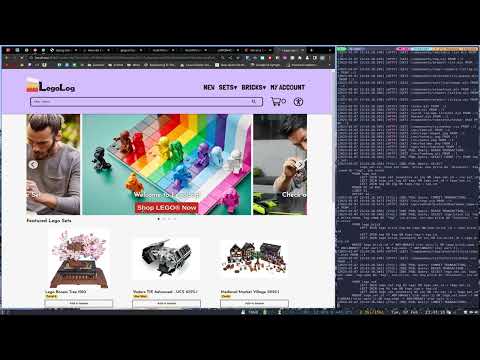](https://www.youtube.com/watch?v=nN2AaVnKMFA "Everything Is AWESOME")
|
|
|
|
# Installation
|
|
|
|
Input psql database credentials into the .env file.
|
|
|
|
For more detailed configuration instructions, see the
|
|
[CONFIGURATION.md](docs/CONFIGURATION.md) file.
|
|
|
|
If npm i fails, and you go down the manual route, see troubleshooting,
|
|
make sure you run it again to fill the database with the data.
|
|
|
|
```bash
|
|
npm run setup
|
|
```
|
|
|
|
A test administrator account exists with the login:
|
|
```text
|
|
username: systemadmin@legolog.com
|
|
password: TestAdministrator123
|
|
```
|
|
|
|
**The demo MUST be run from localhost NOT 129.0.0.1 due to auth0**
|
|
|
|
# Future Plans
|
|
|
|
- "Refine Search" field
|
|
- Make use of worker threads for rendering execution of components
|
|
- Make the marketplace dynamic, more demand should incur a higher price
|
|
- Allow users to create their own sets from bricks the shop sells
|
|
- Could be much more scalable with better transaction management and
|
|
with reduction of redundant API calls from the client
|
|
- There are some snake_case and camelCase inconsistencies among HTTP
|
|
requests that I did not have time to refractor out
|
|
- It would be nice if it was possible for an admin to change the
|
|
price / discount of a product without removing it & adding another
|
|
- There needs to be a stock check __BEFORE__ checkout so that the user
|
|
can "reserve" stock while they checkout and noone else can buy the stock
|
|
at the moment it would be possible to go into negative stock on a
|
|
popular item
|
|
|
|
# Known Issues
|
|
|
|
- There are some issues with selecting modifiers for bricks
|
|
- Sometimes the basket subtotal is incorrect
|
|
|
|
# Troubleshooting
|
|
|
|
Sometimes with installing you must manually install those plugins that
|
|
require `node_gyp` to be installed.
|
|
|
|
The most common to have issues are,
|
|
|
|
```bash
|
|
npm i pg
|
|
npm i jest
|
|
npm i sharp
|
|
```
|
|
|
|
A lot of the time it seems, just deleting package-lock.json does
|
|
the trick :) Happy Shopping!
|
|
|
|
After deleting you must run npm I again, then install the above troubled
|
|
modules.
|
|
|
|
I wish I knew what caused this :/
|
|
|
|
Make sure you run `npm run setup` again, so that first-time-run.js gets run.
|
|
|
|
IF ALL ELSE FAILS - it is running @ http://165.22.114.213:8080/
|
|
However, Auth0 won't work as it's not an allowed domain
|
|
|
|
# Resources / Notes
|
|
|
|
### Web design (i hate web design)
|
|
|
|
- https://www.smashingmagazine.com/2009/06/fixed-vs-fluid-vs-elastic-layout-whats-the-right-one-for-you/
|
|
- https://blog.hubspot.com/website/fluid-design
|
|
- https://jonsuh.com/hamburgers/
|
|
|
|
### Usable shop design
|
|
|
|
- https://www.semrush.com/blog/11-great-examples-ecommerce-navigation-improve-sales/
|
|
|
|
### Databases
|
|
|
|
- https://rebrickable.com/downloads/
|
|
- https://www.bricklink.com/catalogDownload.asp?a=a
|
|
- https://www.eurobricks.com/forum/index.php?/forums/topic/140643-open-and-freely-available-data-set-of-all-partspieces/
|
|
- https://www.sqlitetutorial.net/sqlite-nodejs/
|
|
- https://dbschema.com/features.html
|
|
|
|
# Documentation & Implementation Rationale
|
|
|
|
Make sure to see docs/ for more detailed module documentation
|
|
|
|
IMPORTANT MAKE SURE TO READ CONFIGURATION.md BEFORE RUNNING
|
|
|
|
## 1.1 Content Delivery and Storage of Thousands of Images
|
|
|
|
Due to the fact that there is ~85000 images of individual lego bricks
|
|
and even more of sets. I have chosen not to store them in a database as
|
|
a BLOB or anything else like that as it is inefficient. I am also aware
|
|
of the pitfalls of a conventional filesystem for storage of mass data.
|
|
|
|
The way I have approached a solution for this is in preprocessing, by
|
|
hashing the name of the image file (which is also the brick / set in
|
|
question), I can then use the filesystem's natural directory cache
|
|
speedyness to speed up access times significantly.
|
|
|
|
Take the file name `2336p68.png`, which is a Lego "Cockpit Space Nose",
|
|
after a simple MD5 hash, the result is:
|
|
|
|
```text
|
|
"d2ef319ea58566b55070e06096165cb8"
|
|
^^^^
|
|
d2ef
|
|
```
|
|
|
|
Using the first four characters in the hash, we can allocate images
|
|
into buckets for storage and quick retreval. This acts very similar
|
|
to a hash table implemented in the filesystem.
|
|
|
|
Therefore the path to find this file would be `/d/2/e/f/2336p68.png`
|
|
|
|
Also due to the non-ability to use subdomains during this project, all
|
|
content served like this will use the API suffix, `cdn/`
|
|
|
|
**This implementation description does not take into account resource
|
|
cacheing.**
|
|
|
|
## 1.2 Component System
|
|
|
|
For more technical / implementation specific details see d
|
|
docs/CLIENT-FRAMEWORK.md
|
|
|
|
I chose to use a component system for easy modularisation of pieces of
|
|
the codebase, for example. A basket popout is a perfect use for this,
|
|
as every page has one and repeated code is bad code.
|
|
|
|
However, in retrospect. I would not have made every page's root a
|
|
component, yes it makes it easier to have dynamic state but i feel
|
|
there is a better way to write HTML which doesn't involve the component
|
|
settup process as it introduces a lot of unneccesary overhead and
|
|
potential uncleanlines of code.
|
|
|
|
## 1.3 Database
|
|
|
|
See docs/DATABASE.md for more technical documentation.
|
|
|
|
## 1.4 Orders
|
|
|
|
For the purpose of this demo, there is no collection of card details,
|
|
nor shipping details as this is largely irrelavent without any intent
|
|
to ship nor charge the users items. In all view order views a
|
|
placeholder address is put in place instead of the entered values
|
|
from the checkout.
|
|
|
|
## 1.5 API Design
|
|
|
|
For API specifics and documentation see docs/API.md.
|
|
|
|
The api is simple and stateless and is structured in an MVC kinda way
|
|
but not really as the controllers act as models with the buisness logic
|
|
taking place in the router.
|
|
|
|
Testing would (and should) be easily implemented in src/__tests/ if
|
|
time allowed. However the structure of the codebase would allow this
|
|
easily.
|
|
|
|
## 1.6 Search System
|
|
|
|
I found a big need for a "fuzzy" search when there is a large dataset
|
|
of bricks and sets in use, the user might also not know exactly
|
|
what they're after. I write a little more about this in docs/QUERY.md
|
|
|
|
## 1.7 The remnance of brick-renderer :(
|
|
|
|
Due to my love for graphics, opengl etc. I thought it would be a great
|
|
idea to make a dynamic 3d brick renderer. However it proved quickly
|
|
out of scope, with great sadness I have left the remnance of that in
|
|
the public folder.
|
|
|
|
## LoC
|
|
|
|
```bash
|
|
$ cloc src/ client/
|
|
80 text files.
|
|
76 unique files.
|
|
11 files ignored.
|
|
|
|
github.com/AlDanial/cloc v 1.92 T=0.16 s (477.2 files/s, 55878.6 lines/s)
|
|
-------------------------------------------------------------------------------
|
|
Language files blank comment code
|
|
-------------------------------------------------------------------------------
|
|
JavaScript 51 980 337 5682
|
|
CSS 7 183 26 1121
|
|
HTML 13 52 40 441
|
|
F# 1 8 2 23
|
|
SVG 4 0 0 4
|
|
-------------------------------------------------------------------------------
|
|
SUM: 76 1223 405 7271
|
|
-------------------------------------------------------------------------------
|
|
```
|
|
|
|
# Acknowledgements
|
|
|
|
PortSoc Eslint
|
|
(I'm sorry Jacek, I overwrote your 2 spaces rule, I prefer 4)
|
|
|
|
BrickLink (all images in /db/img are from bricklink)
|
|
|
|
Lego.com (for the images in the carrousel)
|
|
|
|
The MIT Permissive Software License can be found in LICENSE
|
|
|
|
Copyright 2021/22 Benjamin Kyd
|